

DxO PhotoLab PC Software is a powerful raw image processing and editing suite designed for Windows computers. Photographers often capture images in raw formats to preserve maximum sensor data, requiring specialized tools to correct optical imperfections and balance color tones. This desktop application provides professional-grade optical corrections, deep PRIME noise reduction, and advanced local adjustment tools to help creators transform raw camera files into polished photographs.
Overview
Modern digital cameras capture an immense amount of detail, but physical lenses often introduce optical flaws like distortion, chromatic aberration, and vignetting. While standard photo viewers can open basic image files, they rarely provide the sophisticated demosaicing and correction algorithms needed to get the absolute best quality out of a camera sensor. This software serves as an end-to-end processing suite built to handle everything from initial file cataloging to final color grading.
The application targets professional photographers, advanced hobbyists, and digital imaging artists who demand optical precision and pristine image clarity. Operating locally on Windows workstations, it processes large volumes of raw files while keeping image pipelines clean and non-destructive. Its core purpose revolves around automated lens corrections and precise control over tonal dynamics.
Key Features
The software incorporates a comprehensive set of tools designed to optimize image clarity and streamline the editing workflow.
-
DxO Optics Modules: The software utilizes a massive library of custom-tested lens and camera body profiles to automatically correct geometric distortion, softness, and light fall-off.
-
DeepPRIME Noise Reduction: Advanced AI-powered demosaicing and denoising algorithms remove digital noise from high-ISO images while preserving fine details and realistic textures.
-
U Point Technology: Local adjustment tools allow users to apply precise corrections using control points and control lines without complex masking.
-
Smart Lighting Technology: Intelligent exposure balancing automatically recovers shadow details and reins in blown highlights in high-contrast scenes.
-
Complete Raw Management: Integrated file browsing and organizational tools allow photographers to rate, tag, and sort images directly within the workspace.
How DxO PhotoLab PC Software Works
Operating the application follows a structured workflow designed to optimize image quality from the moment files are imported into your workspace.
First, the user obtains the official installation setup package from the developer website and runs the installation wizard on a compatible Windows workstation. Upon launching the program, the integrated file browser allows users to navigate local storage directories and select folders containing raw image files.
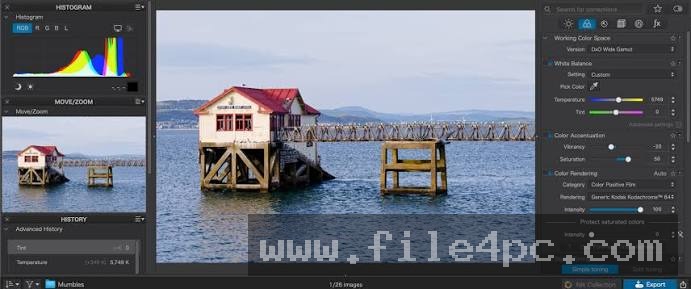
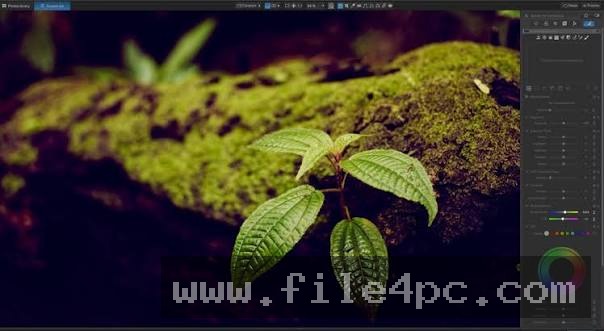
When an image is selected, the software automatically matches the camera and lens profile from its database, applying baseline optical corrections instantly. The user can then switch to the customize tab to adjust exposure, apply local control points, or fine-tune color curves. Once editing is complete, the file can be exported into standard web or print formats like JPEG, TIFF, or DNG, yielding a fully processed final image. Users should always maintain organized backup copies of their original raw files before bulk exporting edited versions.
Benefits and Limitations
Benefits
The primary advantage is the exceptional quality of its automated optical corrections and noise reduction engine. DxO Optics Modules eliminate lens flaws with mathematical precision that generic profile adjustments cannot match. Additionally, the U Point local adjustment system simplifies selective editing without requiring tedious brush masks.
Your May Also Like :: Duplicate Finder Professional PC Software
Limitations
The software operates on a commercial licensing model requiring a paid purchase or subscription upgrade. It also demands robust computer hardware, particularly a dedicated graphics card with adequate VRAM, to run its advanced AI noise reduction smoothly. Furthermore, it focuses entirely on photo processing and raw editing rather than vector illustration or graphic design.
What's New
Recent software releases focus heavily on enhancing the speed and efficiency of AI-driven noise reduction engines and expanding support for newly released camera bodies and lenses. Developers continue to refine the optical profile database, adding corrections for contemporary mirrorless zoom and prime lenses.
Recent updates also introduce optimized user interface elements designed to make local adjustment layers easier to organize and manage across large photo libraries. These routine improvements ensure the software remains fully compatible with modern Windows operating system builds and high-resolution hardware displays.
Installation and Setup
Installing the utility requires standard administrator privileges on your Windows PC to ensure proper registry integration and codec registration. Users should always obtain setup files directly from the official DxO website to ensure software authenticity and safety.
Run the installer executable and follow the prompts provided by the setup wizard to place application files on your preferred drive. Enter your valid license key during the initial launch phase to unlock all professional editing features. Configure your default export folders and file naming templates before beginning your first photo editing session.
Tips for Using DxO PhotoLab PC Software
To achieve the best results when processing your digital images, keep several practical guidelines in mind:
-
Let Optics Modules Run First: Allow the automatic lens correction profile to load before applying manual sharpening or distortion tweaks.
-
Use Control Points Wisely: Place U Point control points on specific color or luminance areas to adjust exposure locally without affecting the entire frame.
-
Leverage Batch Export: Set up custom export presets to convert large batches of edited raw files into web-ready JPEGs simultaneously.
-
Organize with Projects: Use virtual projects to group images from different folders together for targeted editing sessions.
Modern Alternatives
Adobe Lightroom Classic offers a comprehensive cataloging ecosystem alongside robust raw editing and cloud synchronization features. Capture One provides professional tethered shooting capabilities and precise color grading tools tailored for studio photographers.
RawTherapee offers a free, open-source alternative with advanced processing controls for users seeking non-commercial solutions. Choosing between these alternatives depends on whether you prefer subscription cloud workflows, studio tethering, or open-source availability.
Who Should Use DxO PhotoLab PC Software?
This software is well-suited for landscape, wildlife, and portrait photographers who shoot in raw formats and demand the highest possible optical clarity and noise control. It benefits professionals and advanced hobbyists who want scientific precision in their lens corrections and lighting adjustments.
Conversely, casual smartphone photographers or users who only edit JPEGs occasionally will find the deep raw processing capabilities more advanced than necessary. Similarly, graphic designers who focus on digital illustration or layout design will find dedicated design software far more relevant.
FAQ
Does the software support RAW files from all camera models?
Yes, the application supports raw files from hundreds of camera models, with new camera and lens profiles added regularly through database updates.
Is an internet connection required to use the editing tools?
An internet connection is required during initial installation, activation, and lens profile downloads, but core editing functions operate offline.
Can I use custom presets in DxO PhotoLab?
Yes, users can save custom adjustment settings as presets to apply consistent visual styles across multiple images quickly.
Does the program include file management features?
Yes, the built-in photo library allows users to rate, color-label, keyword, and organize image folders directly within the interface.
Conclusion
DxO PhotoLab PC Software offers a sophisticated, optically precise environment for processing raw digital photographs on Windows systems. By combining automated lens profile corrections with powerful AI noise reduction and flexible local tools, it elevates the quality of digital image workflows.
Evaluating your photographic requirements will help determine whether this advanced processor fits your creative routine. For photographers seeking uncompromising image clarity and professional-grade editing controls, this software delivers exceptional results.

💬 0 Comments
✍ Leave a Comment